*Project: Singing Bittle X - Train Bittle X to show a personality through moods, movement, and singing
Table of Contents
Video Tutorial with Petoi Coding Blocks to Illustrate the Workflow
Thinking about the Task
- How can we use coding blocks as a sequence of events?
Initial Setup
Be sure to make sure Web Coding Blocks are set up:
https://docs.petoi.com/web-block-base-programming/petoi-web-coding-blocks
Let’s Code! - Make Bittle Sing
Open up the Web Coding Blocks.
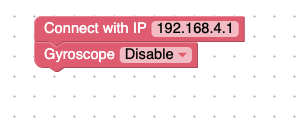
The web-based coding blocks start with these two statements: Connect with IP and gyroscope. The IP of your computer is explained in the web coding block setup tutorial. The gyroscope disabled means that the dog has Motion sensor that stays off. You don't have to change these.
Find the Repeat block and the Wait block. Then add it to the program. Your program should look like this:
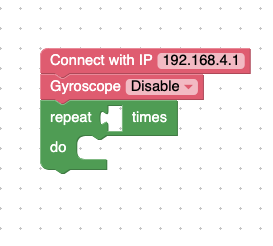
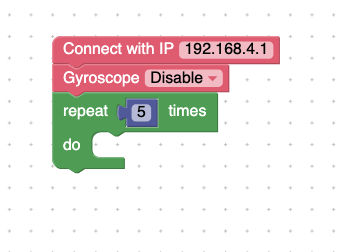
Finally, add the Analog write blocks like below:
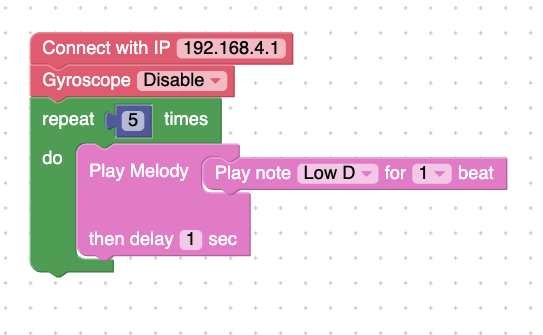
Try running the program.
Explanation: Bittle will make a sound that repeats 5 times, with a 1 second delay between the sounds.
Let’s Code! - Make Bittle Move
To make Bittle move, we can reuse the same blocks as before, but change what happens in the repetition. Find the Perform skill blocks, and make Bittle do one of the skills as shown below.
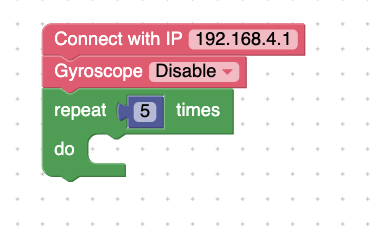
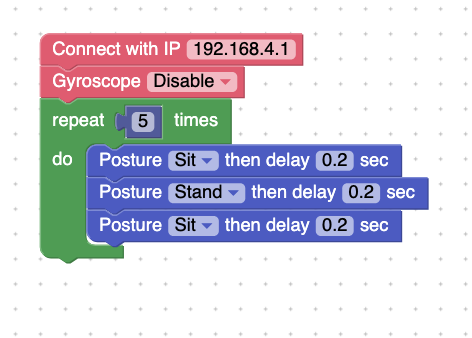
Try running the program to see what happens.
Explanation: Bittle performs the tricks, and there is also a 0.2 second delay between the tricks. Bittle repeats them until the program is complete.
More Melody
Make Bittle sing a melody using notes:
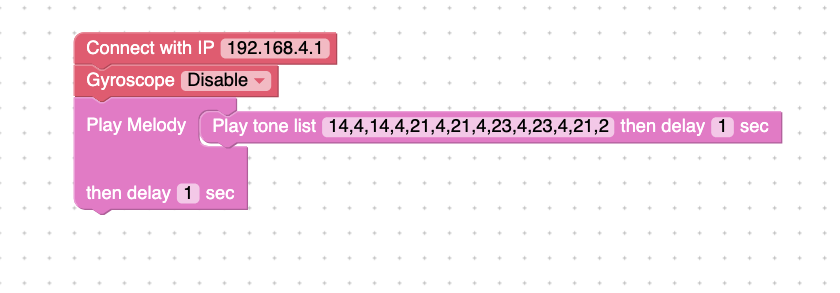
Project Takeaways
- Bittle can perform specific skills.
- Using the
Play melodyskill can play specific tones.
You-Try
- Make Bittle have a unique personality through singing and movement. Choose a personality and mood to show, such as happy, sleepy, or sad.
- Make Bittle Walk Around Objects in an Obstacle Course.